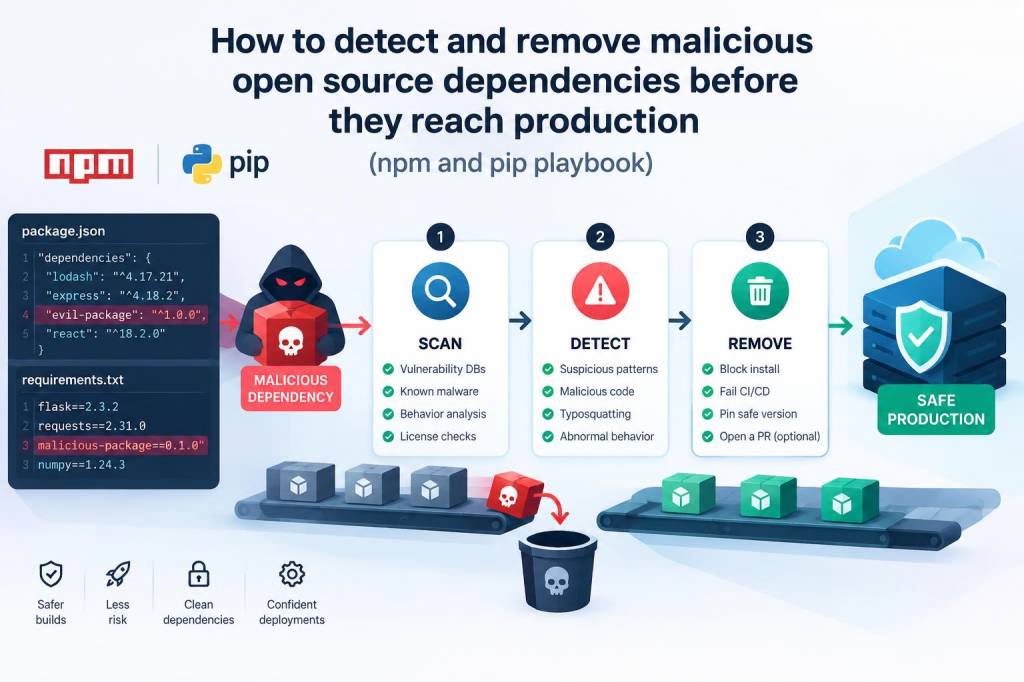
I build and ship software for a living, and one thing I've learned the hard way is that most supply‑chain compromises start small: a tiny, trusted package gets a subtle, malicious change and suddenly you're executing attacker code in production. Whether you work with npm or pip, detecting and removing dangerous open‑source dependencies before they hit production is a practical exercise in automation, hygiene and threat hunting. Below I share a playbook I use with engineering teams to prevent, detect and remediate malicious packages.
Why this matters — short, real‑world risk model
Attackers favor package ecosystems because developers pull libraries without thinking about runtime behavior. Common attack vectors include:
- Typosquatting: malicious packages with names similar to popular ones (e.g., “expresss” vs “express”).
- Dependency confusion: attackers publish internal package names to public registries.
- Backdoored maintainer accounts: a maintainer’s account is compromised and a release injects a payload.
- Malicious updates: a previously benign package receives an intentionally harmful change (event-stream is a canonical npm example).
These attacks can result in data exfiltration, credential theft, cryptomining, remote code execution and more. The good news: most are detectable with a layered approach that mixes automation, code review and runtime controls.
High‑level playbook
My playbook groups controls into prevention, detection and response. Implement as many layers as you can; each layer reduces the chance a malicious package reaches production.
- Prevent: limit exposure and reduce attack surface.
- Detect: scan, monitor and triage suspicious changes early.
- Respond: isolate, remove, and harden to prevent recurrence.
Prevention: hardening the dependency intake
Start by restricting how packages enter your codebase.
- Pin and lock: Use lockfiles (package-lock.json, npm-shrinkwrap.json, poetry.lock, Pipfile.lock). Commit them and deploy from locks only. npm ci and pip install --require-hashes (or pinned versions) give reproducible builds.
- Use private registries and scoped packages: For internal packages, use a private npm registry (Artifactory/Nexus/verdaccio) or private PyPI repo to avoid dependency confusion. Configure the registry resolution order so internal names can’t be resolved to the public registry by mistake.
- Restrict publishing and modify policies: Enforce 2FA and MFA on maintainer accounts where possible. Use organization policies to control who can publish.
- Vet new dependencies: Before you allow a new dependency, run a lightweight checklist: recent downloads, active maintainer, linked GitHub repo, license, no suspicious post‑release yank/republish activity.
- Prefer small surface‑area libraries: Avoid giant dependency trees when a lightweight helper would suffice.
Detection: automated and manual checks
Automated tooling catches most accidental issues; manual review catches the rest.
Automatic scanners and tools I rely on:
- npm audit — built into npm, catches known vulnerabilities but not malicious intent.
- pip-audit / safety — for Python dependency vulnerability scanning.
- Snyk / GitHub Dependabot / Renovate — these monitor dependencies and open PRs for vulnerable updates; Snyk also does malicious package detection heuristics.
- OSS Index / PyPI metadata checks — check package metadata, release patterns and download counts.
- sigstore / in-toto verification — validate provenance when packages are signed.
Static checks I add:
- Scan dependencies for postinstall scripts and lifecycle hooks in npm (these are frequent attack vectors). Flag packages with a postinstall script for manual review.
- Search for suspicious strings or network calls in package code (e.g., base64 decoding + child_process, eval, new Function, requests to unknown hosts).
- Check for binary wheels or native extensions in Python packages; they increase risk because they can include opaque compiled code.
CI integration — make detection part of your pipeline:
- Fail builds if new dependencies trigger high‑severity findings.
- Run dependency linters during PRs and require human approval for packages that add install scripts or native code.
- Example (npm): run a job that executes `npm ci && npm audit --json | jq ...` and parse results, and a second job that checks package.json new entries for suspicious fields.
Practical heuristics to flag a package
Not all suspicious signs mean maliciousness, but they deserve attention:
- Package name is one character off from a popular project or uses non‑ASCII characters that mimic ASCII.
- Recent low download count but sudden spike in a short window.
- New versions replace a package’s previous behavior drastically (e.g., suddenly adding network code or shell execution).
- Postinstall, preinstall, or other lifecycle scripts present.
- Maintainer account created recently with minimal history.
Manual triage checklist
When automation flags a package, I run these one‑off checks:
- Open package source on GitHub — is the repo real and active?
- Inspect the diff between the last safe release and the new one — any added network calls, obfuscated code, or scripts?
- Check published metadata for suspicious homepage, repository, or bug links.
- Run the package in an isolated sandbox (container or ephemeral VM) and monitor outbound network calls and spawned processes.
- If in doubt, reach out to the maintainer via official channels before merging.
Containment and removal steps if you find malicious code
If you discover a malicious dependency already in a branch or a release candidate, act quickly and traceably:
- Isolate: Revoke any credentials that may have been compromised. Roll back deployments using the last known-good lockfile.
- Remove: Replace the package with a safe alternative, or vendorize a vetted copy (copy source into your repo and maintain it under your control) if no replacement exists.
- Pin to a safe version and block the malicious version in your registry or package manager configuration (npm supports npm config set //registry.npmjs.org/:_authToken="" and private overrides; for PyPI use a private index or pip.conf to ignore specific versions).
- Patch: If you must keep functionality, fork the package, remove the malicious bits, and publish under an internal scope.
- Audit runtime: Look for indicators of compromise — unusual outbound traffic, new secrets in logs, or suspicious processes.
- Notify: Inform your security team, leaders and (if applicable) the supplier/maintainers and the package registry. Consider filing an abuse report to npm or PyPI.
Operational best practices and tools I use
Over time I converged on a stack that balances cost and coverage:
- Version control + enforced lockfiles (GitHub + package locks).
- Dependabot/ Renovate for upgrade PRs, with rules that require human approval for “risky” packages (native code, scripts).
- Snyk or a similar commercial scanner for continuous monitoring of malicious patterns.
- Local triage environment: Docker containers with tcpdump and eBPF tools to observe network and system calls when evaluating suspect packages.
- Private registry (verdaccio for small teams) with whitelist/blacklist support and caching to avoid accidental pulls from public registries.
- Build reproducibility: npm ci, pip install --require-hashes, signed artifacts where possible (sigstore).
Sample CI failure rule examples
| Rule | Action |
|---|---|
| New package added with postinstall script | Fail PR and require manual review |
| Dependency has n or fewer downloads and new release | Annotate PR with warning, require justification |
| Package name similar to popular package (edit distance <=2) | Block automatic merge until human checks |
When to accept risk and when to eliminate a dependency
Not all dependencies are removable. I weigh utility vs risk. If a package is central and the maintainer is reputable, accept small risk but monitor closely. If the package is replaceable or rarely updated, prefer vendorizing or replacing it. For high‑security contexts (secrets management, crypto, authentication), my bar is much higher: prefer audited libraries with active maintainers and signed releases.
Detecting and removing malicious dependencies is never a one‑time project. It’s a set of practices you fold into development: scan early, require review for risky changes, limit runtime privileges, and instrument your systems to detect odd behavior. The effort pays off: fewer surprise incidents, faster remediation when things go wrong, and confidence that deployments aren’t delivering strangers’ code into your production systems.