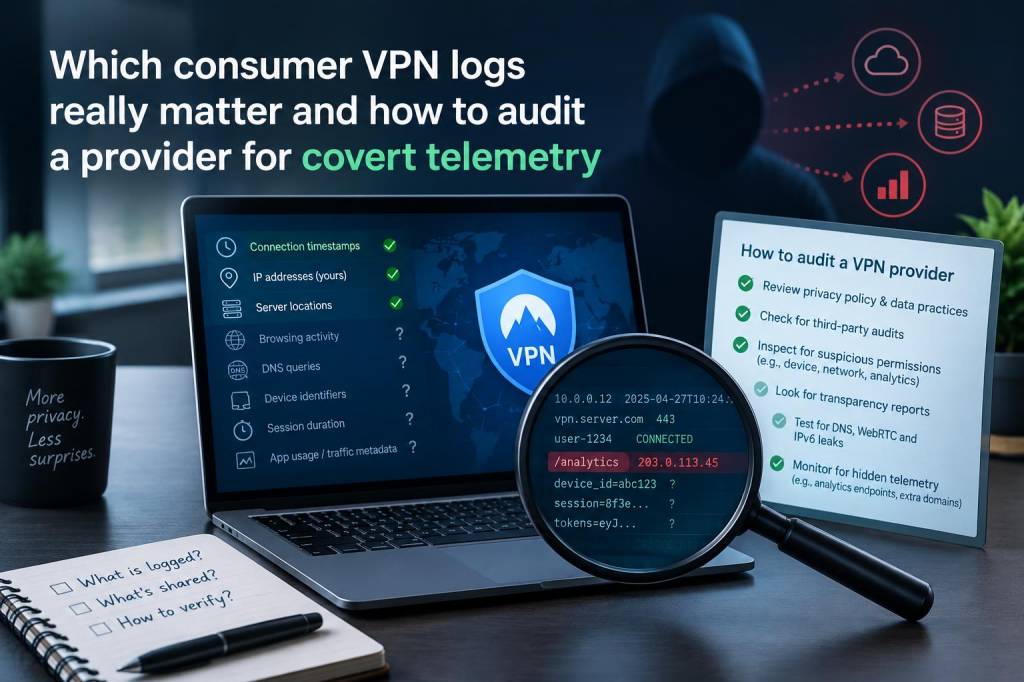
When I evaluate consumer VPNs, the headline claim—"no logs"—is rarely the whole story. As a technology writer who tests tools and threat models, I want to know not just whether a provider stores your browsing history, but which types of logs actually matter for the risks I care about, and how to detect covert telemetry or secret collection that undermines privacy claims. Below I share a practical, hands‑on approach to understanding what VPN logs mean, which ones are most dangerous, and how to audit a provider for hidden telemetry using a mix of policy review, network testing and basic reverse engineering.
What "logs" actually are (and why the nuance matters)
VPN vendors use the word "logs" in different ways. Some collection is necessary for operating a service—think billing, abuse management and troubleshooting. The crucial questions are: what is collected, how long is it retained, where is it stored, and who can compel access?
- Connection metadata: timestamps, session start/stop, IPs assigned to you. This can be used to correlate you to activity if retained with identifying info.
- Authentication data: account email, hashed password, OAuth tokens. These link an account to identity.
- Traffic logs: destinations, URLs, DNS queries, SNI, full packets. This is the most privacy‑sensitive—it's pretty much your browsing history.
- Diagnostics and crash reports: stack traces, system info, app logs. These can leak identifiers or network details unless scrubbed.
- Telemetry/analytics: device IDs, usage metrics, feature flags, A/B test IDs. Often benign but can be used to re‑identify users across sessions or devices.
From a privacy perspective, traffic logs and DNS/SNI leaks are the most dangerous. Connection metadata is also meaningful if tied to an account or IP. Telemetry is often overlooked, but modern analytics pipelines can combine innocuous signals to fingerprint users.
Red flags in policy and operations
Start with the easy wins: the privacy policy, terms of service and published architecture. Look for these red flags:
- Vague wording like "we may collect" without specifying what or retention period.
- Broad exceptions for complying with law enforcement without specifying what they can access.
- No independent audits or third‑party verification of claims (e.g., preservation of "warrant canary" is better than nothing but not a substitute).
- Hosted in adversarial jurisdiction with extensive surveillance laws or intelligence sharing (Five Eyes, Fourteen Eyes).
- Closed‑source clients with opaque update mechanisms that could deliver telemetry without user knowledge.
Hands‑on checks you can run
Reading policy is necessary but insufficient. Here are reproducible tests I use when auditing consumer VPN clients for covert telemetry.
1) Network traffic capture and analysis
Run the VPN client inside a controlled environment (your laptop or a VM) and capture traffic with Wireshark or tcpdump. Look for:
- DNS queries generated by the client rather than routed through the VPN—this indicates leaks or hardcoded resolvers.
- Outgoing connections to analytics domains (Google Analytics, Amplitude, Sentry, Mixpanel, Firebase). These often carry telemetry or crash reports.
- Unusual ciphertext connections to third‑party CDNs or servers not listed in the provider's server roster.
- TLS SNI headers (if not using ESNI/ ECH) showing destination domains even when traffic is meant to be proxied.
Example: when testing a Windows client, I once saw repeated HTTPS calls to an analytics endpoint that included query params with an opaque ID. That ID persisted across sessions and servers—classic persistent telemetry.
2) Compare expected vs actual endpoints
Providers usually document or list their VPN server hostnames. Compare that list to the observed destinations in your packet capture. Unexpected endpoints (for updates, telemetry, CDN) deserve scrutiny. Use reverse DNS, certificate inspection and IP ownership lookups (whois) to map the infrastructure.
3) Inspect the client binary
If the client is closed‑source, basic static analysis can reveal embedded domains, analytics libraries, and endpoints. Tools I use:
- strings (to find hardcoded domains or IDs)
- lsof / netstat while the client runs (to see active sockets)
- Process Monitor (Procmon) on Windows to watch registry or file writes
On macOS/Linux you can run strace or dtruss to see system calls. For mobile apps, extracting the APK or IPA and searching for package names (com.google.firebase) can be revealing.
4) Dynamic instrumentation
Run the client in a sandbox or VM and monitor its behavior over time. Pay attention to:
- Periodic beaconing to analytics backends—do calls occur even when not actively connected?
- Crash handlers automatically sending data on any failure—are stack traces or system logs included?
- Persistence mechanisms—does the app install background services or scheduled tasks that phone home?
Tools like mitmproxy let you intercept HTTPS if you can install a certificate in the test environment. For apps that use certificate pinning, observe DNS and IP traffic to identify the endpoints for later investigation.
5) Check cryptographic hygiene
Good VPN clients encrypt control and data channels, but poor configurations can leak metadata. Verify:
- Whether WireGuard or OpenVPN is implemented in a way that preserves privacy (e.g., WireGuard's static keys mean server‑side logs of keys could be problematic if retained).
- Use of TLS 1.2 vs 1.3 and whether ESNI/ECH is supported for hiding SNI. Lack of ECH means SNI can leak destination domains.
- Whether DNS requests are forced over the tunnel or sent to provider resolvers; do requests leave unencrypted?
6) Evaluate server architecture and retention
Ask the provider specific questions: do servers run in RAM or on disk? Are logs rotated, and who has access? RAM‑only servers (often called "diskless" or "ephemeral") and frequent key rotation are good signs. Independent audits should verify these claims.
| Log type | Privacy impact | What to check |
|---|---|---|
| Traffic logs (URLs, packets) | High | Network captures, DNS/SNI checks, policy promises |
| Connection metadata (timestamps, session IP) | Medium | Retention policy, account linking, jurisdiction |
| Telemetry/Analytics | Medium–High (if persistent) | Packet analysis, binary strings, third‑party domains |
| Diagnostics/Crash reports | Low–High (depends on content) | Test crashes in sandbox, inspect payloads |
How to practically audit a VPN provider (checklist)
Here’s a checklist I use before trusting a VPN with sensitive browsing:
- Read privacy policy and ask for clarifications in support channels; save their answers.
- Verify jurisdiction and whether the company or parent is registered in a surveillance‑friendly country.
- Look for independent audits and source code (client or server). If code is closed, prefer vendors with frequent audits.
- Run a controlled packet capture during installation, idle, and active use; look for analytics domains and DNS leaks.
- Inspect the client for hardcoded domains and embedded libraries (strings, lsof, strace).
- Test for DNS, IPv6 and SNI leaks with online tools and your own captures.
- Ask the vendor whether servers are diskless, how keys are rotated, and what their retention periods are.
- Observe update mechanisms—do updates come from vendor servers or third‑party CDNs that could deliver altered binaries?
Auditing a provider isn’t always trivial—especially for closed‑source apps—but even basic network captures and a skeptical read of the privacy policy will reveal most common telemetry vectors. The landscape is messy: some providers are genuinely privacy‑focused and publish architecture documentation, while others bundle analytics or rely on third‑party services that undermine anonymity.
Ultimately you need to align threat model and trust: for casual privacy (avoiding ISP tracking), many mainstream VPNs suffice. For adversaries that can compel logs or perform traffic correlation, you need a provider with minimal metadata retention, RAM‑only servers, independent audits, and a clean client that doesn't phone home. If you're unsure, prefer open‑source clients and vendors with transparent practices—then run your own network tests to verify what they actually send.