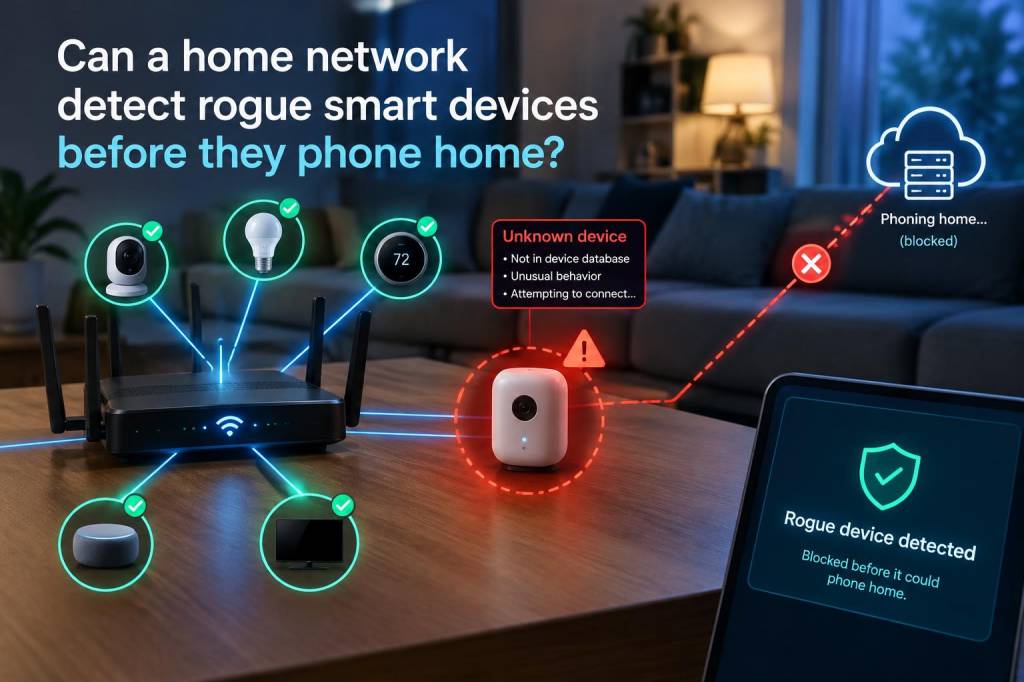
I spend a lot of time thinking about where security failures begin, and in many homes they begin in a very ordinary moment: someone plugs in a smart device, opens an app, accepts a few prompts, and assumes everything is safe. In reality, a device can start talking to the internet almost immediately, often before anyone has had a chance to inspect what it is doing. That is why I pay close attention to whether a home network can spot a rogue smart device before it phones home. In my experience, yes, it can — but only if you set the network up with enough visibility and enough control.
When I say rogue, I do not only mean a malicious gadget. I also mean a device that behaves unexpectedly, reaches out to unknown servers, ignores your privacy expectations, or simply belongs to someone who should not be using your network. A cheap camera, a questionable streaming box, a mislabeled sensor, or a compromised bulb can all become a problem fast. The good news is that home networks are far more capable than many people assume. The bad news is that most default router setups are blind to too much.
What “phone home” really means in practice
In security terms, a device phones home when it reaches out to a remote server, usually over DNS, HTTP, HTTPS, MQTT, or some other outbound connection, to register itself, fetch updates, sync telemetry, or receive commands. For a smart device, that behavior is normal to a point. A thermostat may need cloud access. A speaker may contact a vendor service. A robot vacuum may upload maps. But once a device starts contacting servers you did not expect, at times you did not expect, or in ways that do not match its stated function, I start paying attention.
That timing matters. If you can detect the device before it makes its first outbound connection, you gain a narrow but valuable window. During that window, you can isolate it, inspect it, block it, or move it onto a safer segment of your network. If you miss that window, the device may already have announced itself, downloaded updates, enrolled in a cloud account, or exposed metadata about your household.
What a home network can actually see
A decent home network can observe a surprising amount of behavior, even without enterprise gear. At a minimum, it can see a new MAC address, a new IP lease, DNS queries, DHCP requests, and the volume and destination of traffic. With better tooling, it can identify vendor fingerprints, TLS certificate patterns, and unusual outbound connections. That is often enough to spot a suspicious device before it fully settles in.
In my own testing, I have found that the first clues usually come from simple signals:
- A new device appears on Wi-Fi or Ethernet at an unexpected time.
- The device requests a DHCP lease and identifies itself with a strange hostname.
- It begins DNS lookups for domains that do not match its function.
- It opens many outbound connections in quick succession.
- It tries to reach cloud services before any local setup is complete.
These clues do not prove malice, but they do raise confidence that something deserves a closer look. The stronger your network visibility, the earlier you can catch that behavior.
Where most people lose visibility
The default home router is often too limited to be useful for detection. Many ISP routers show only a vague device list and a few traffic counters. That is not enough for meaningful scrutiny. If a smart device joins the network and starts calling out, the router may simply show a generic entry like “IoT-1234” or “unknown device.” That kind of label helps very little.
I have also seen people connect everything to one flat network, which means cameras, laptops, phones, speakers, and bulbs all share the same broadcast domain. In that arrangement, a rogue smart device blends in easily. Even if you notice it, it is harder to contain because it already sits next to your trusted machines.
Another common blind spot is encrypted traffic. A lot of outbound traffic is hidden inside HTTPS, which means you may not see the exact content of the communication. Still, you can often see destination domains, connection frequency, packet sizes, and timing. That is enough to build useful suspicion patterns, even if you cannot read the payload.
What I use to detect suspicious devices early
When I want earlier detection, I look for tools that give me layered visibility rather than a single dashboard. A good setup usually combines router logs, DHCP records, DNS monitoring, and network segmentation. On more advanced setups, I like using a firewall that can run detailed rules and export logs to a local system for review.
Some tools and approaches I trust more than others:
- DHCP logging so I can see when a new device first requests access.
- DNS logging so I can spot first contact with unfamiliar domains.
- VLAN segmentation so IoT gear stays away from laptops and work devices.
- Firewall alerts so outbound traffic can be flagged immediately.
- Passive network discovery so unknown hardware is identified as soon as it speaks.
On consumer gear, I have had decent results with routers and firewalls that support per-device visibility, ad blocking at the DNS layer, and guest network isolation. On more serious setups, I prefer a small firewall appliance or a router platform that allows custom rules and local logging. That extra control makes a real difference when I am trying to spot a new device before it escapes into the cloud.
What signals make me suspicious
I do not panic when a device connects. I look for patterns that do not fit. A smart plug that contacts a data-heavy analytics domain is odd. A camera that tries to reach multiple foreign servers during initial setup is more concerning. A light bulb that opens a large number of outbound sessions is not normal in my book.
These are the signals I treat as warning signs:
- Repeated DNS queries for random-looking domains.
- Connections to regions unrelated to the vendor’s documented infrastructure.
- Traffic that continues even when the device is supposedly idle.
- Connections that begin before any app pairing is finished.
- Attempts to bypass local network restrictions.
I also pay attention to timing. A device that phones home within seconds of power-up may simply be eager to register, but if it continues to connect before setup is complete, I want to know why. In some cases, I will unplug it, inspect the packaging, check firmware details, and see whether other users have reported unusual behavior. That combination of network observation and basic research catches many problems early.
Can a home network stop a device before first contact
Yes, but only if you build for prevention rather than reaction. Detection alone tells you something happened. Prevention lets you interrupt it. The strongest setup I have used involves a default-deny approach for new devices, especially IoT gear. That means a new device gets placed in a restricted network zone with no broad internet access until I explicitly allow it.
I like this approach because it changes the question from “what did the device already do?” to “what is it allowed to do?” If a smart device tries to contact home immediately, the firewall can block that attempt and log it. I then inspect the logs before deciding whether to trust the vendor domains, permit limited access, or reject the device entirely.
There is another benefit here: a blocked first contact can reveal how stubborn or noisy a device is. Some products fail gracefully and wait for permission. Others retry aggressively, probe multiple endpoints, or fall back to insecure behavior. That information is extremely useful when deciding whether a gadget deserves a place in my network.
What a practical home setup looks like
If I were building a home network for early rogue-device detection, I would keep it simple but disciplined. I would separate trusted devices from IoT devices, log DNS requests locally, and make sure every new device lands in a restricted zone first. I would also disable automatic trust decisions, because many consumer systems are eager to make things “easy” at the expense of visibility.
| Network Element | What It Reveals | Why I Care |
|---|---|---|
| DHCP logs | First device appearance | Shows when something joins |
| DNS logs | Domains being contacted | Shows first outbound intent |
| Firewall logs | Blocked or allowed connections | Shows policy violations |
| VLAN separation | Device isolation | Limits damage if trust is misplaced |
| Traffic monitoring | Volume and timing | Shows unusual behavior patterns |
That setup does not require enterprise infrastructure. It does require discipline. I think that is where many home networks fall short. People buy a smart device because it promises convenience, then they connect it to the same network that holds work laptops, personal phones, NAS systems, and family backups. That is a poor trade. A little isolation buys a lot of safety.
What I would do if I found a rogue device
If a device looks wrong, I act fast. I disconnect it from power or network access, check the device name and hardware details, review its first outbound destinations, and compare that behavior against the vendor documentation. If it still looks suspicious, I keep it quarantined. If it is clearly misbehaving, I reset it, update it only from a trusted path, or remove it entirely.
Sometimes the issue is not maliciousness but poor design. A cheap gadget may be overly chatty, poorly documented, or reliant on sketchy cloud services. In those cases, I still treat it as a risk. A weak product can create the same practical problems as a malicious one if it leaks data, ignores consent, or opens unpredictable network paths.
So when people ask me whether a home network can detect rogue smart devices before they phone home, my answer is yes, provided you give that network enough observation and enough authority. If you only use the default settings on a consumer router, your visibility will be thin. If you add logs, segmentation, and blocking rules, you can catch a device early enough to make a meaningful decision about it. That early decision is where real control begins.